If you have ever flipped through the corner of a notebook to watch a stick figure walk, you have already mastered the core philosophy of the industry. At its most primal level, all motion on a screen is a grand illusion. It is a lie that our brains desperately want to believe. We call this “Persistence of Vision,” and it is the only reason that a series of static animation frames can convince you that a character is actually breathing, running, or crying.
For the aspiring animator, understanding animation frames is like a musician understanding notes. It is the smallest unit of your art. While modern software can “tween” or interpolate movement for you, there is an undeniable soul in frame-by-frame animation that cannot be replicated by an algorithm. This guide is built for those who want to get their hands dirty in the technical and artistic weeds of the craft. We will dissect the animation frame definition, explore the types of frames in animation, and explain exactly how to manipulate these tiny slices of time to create something legendary.
What Is An Animation Frame?
Before you can create a masterpiece, you need to understand the molecular structure of your medium. So, what is a frame in animation? In the simplest technical terms, a frame of animation is a single static image in a sequence of images. When these images are displayed in rapid succession, the human eye cannot distinguish them as individual pictures. Instead, our brains bridge the gaps, creating the fluid sensation of movement.
Think of a movie reel. If you hold it up to the light, you see a long strip of tiny, individual photographs. Each one of those is an animation frame. When you hear the term “Frame Rate” or “FPS” (Frames Per Second), it refers to how many of these individual images are flashing before your eyes every second. In standard cinematic animation, that number is usually 24. This means that for every single second of a Disney classic or a Studio Ghibli epic, 24 distinct drawings were crafted, captured, and projected.
Why Do Modern Creators Still Choose Frame-by-Frame Animation?
In an era of high-end 3D rigging and AI-assisted motion, why would anyone choose the painstaking path of drawing every single frame of animation? The answer lies in the “hand-crafted” feel. Frame-by-frame animation allows for artistic expression and “squash and stretch” effects that automated systems often struggle to replicate.
When you control every animation frame, you are not limited by what a digital skeleton can do. You can exaggerate a character’s expression, distort their body for a comedic “smear” effect, and inject a sense of weight and personality that feels organic. This is why many of the most iconic moments in animation history, from the chaotic energy of Looney Tunes to the fluid combat in Akira, were built one animation frame at a time. It is the difference between a programmed synthesizer and a live violin performance. One is perfect; the other is alive.
Your Vision, Frame by Frame.
Building a truly iconic character requires more than just software; it requires a deep understanding of movement and timing. At Cloud Animations, our team of artists and technicians lives for the details. Whether you partner with an explainer video studio for a high-fidelity 2D explainer or need a complex 3D cinematic, we treat every animation frame as a work of art. We don’t just move pixels; we tell stories. Explore our full suite of animation solutions today!
The Anatomy of a Sequence: Types of Frames in Animation
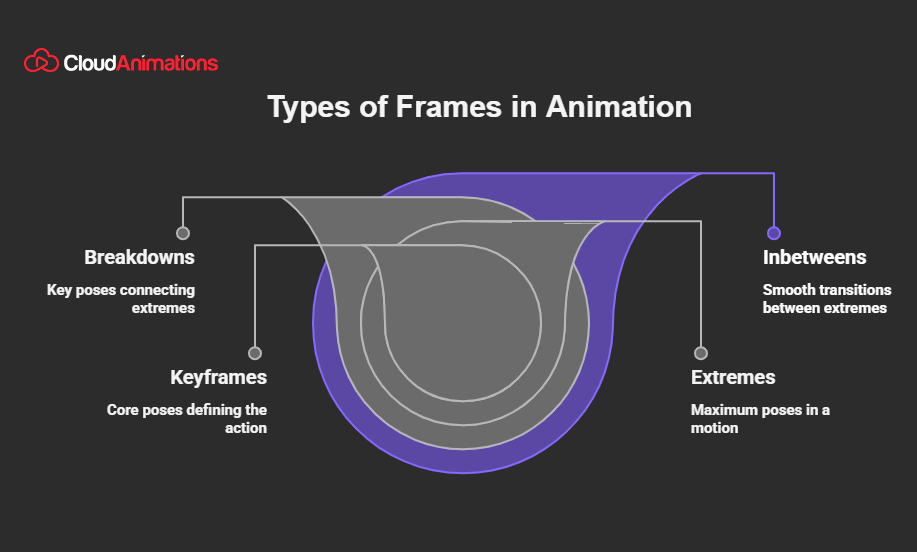
Not all animation frames are created equal. If you tried to draw every single movement with the same level of detail, you would never finish a single minute of footage. Professional animators use a hierarchy to manage their workflow and ensure the motion looks intentional. Understanding these types of frames in animation is the first step toward professional-grade work.
1. Keyframes (The Pillars)
The key animation frame is the most important. These frames define the starting and ending points of any smooth transition. If a character is jumping, the keyframes would be the crouch before the jump, the peak of the arc in the air, and the moment of impact on the ground. These are the “storytelling” frames that define the action. In a studio environment, the lead animator usually draws the keyframes, leaving the “filler” work to others.
2. Extremes (The Limits)
Extremes are the frames that show the furthest extent of a movement. If a character is swinging a sword, the moment the sword is pulled back as far as it can go is an “extreme.” These are vital for establishing the “arc” of a movement. Without well-defined extremes, your frames in animation will feel stiff and robotic.
3. Breakdowns (The Connection)
Breakdowns sit between your keyframes and your extremes. They define how the character gets from Point A to Point B. Does the character snap quickly? Do they lunge with a heavy drag? The breakdown determines the “flavor” of the movement. This is where you implement the “Twelve Principles of Animation,” particularly things like overlapping action and drag.
4. In-betweens (The Fluidity)
These are exactly what they sound like: the animation frames that fill the gaps between everything else. The more in-betweens you have, the smoother the motion will be. In the industry, this is often where the heavy lifting happens. To save time, many shows are animated “on twos,” meaning one drawing is held for two frames of film (effectively 12 drawings per second instead of 24). This gives the animation a slightly “crunchier” but still fluid look that we associate with classic Saturday morning cartoons.

Mark Wilson
Mark is a Senior Content Marketer with 7+ years of experience in growing B2B, B2C, e-commerce, SaaS, & Digital Design Brands. He’s a polished writer, SEO geek, optimist at heart & good at playing table tennis.
Get the week’s best
marketing content

How Frame-by-Frame Animation Works: Step-by-Step Guide
Now that we have covered what are frames in animation, let’s look at the actual workflow. How do you go from a blank page to a living sequence?
Step 1: The Thumbnail Phase
Before you draw a single high-quality animation frame, you must plan. Animators create tiny, rough “thumbnails” to map out the action. This isn’t about detail; it’s about silhouette and flow. You are looking for the “line of action” that will guide the viewer’s eye through the sequence.
Step 2: Drawing the Keys
You start by drawing your main animation frames. These need to be clear and strong. If your keyframes don’t work, no amount of smooth in-betweening will save the scene. Professionals often use “lightboxing” (placing a new sheet of paper or a semi-transparent digital layer over the previous one) to ensure that the character’s proportions stay consistent.
Step 3: Timing and the “X-Sheet”
In the old days, animators used an Exposure Sheet (or X-Sheet) to plan how many animation frames each action would take. Today, we use digital timelines. You decide the timing here. Does the character’s head turn slowly over 12 frames, or does it snap in 3? This is where “spacing” comes in. If your animation frames are close together, the movement is slow. If they are far apart, the movement is fast.
Step 4: The Inbetweening Grind
Once the keys and breakdowns are set, you fill in the rest. This is where you focus on the “arc” of the movement. Nothing in nature moves in a straight line; everything moves in arcs. As you draw each animation frame, you must ensure that the tip of a nose or the arc of a hand follows a smooth, curved path.
Step 5: Clean-up and Ink
Your rough sketches are likely a mess of construction lines. In the clean-up phase, you create a final, “tight” line for every animation frame. This is a test of consistency. If the character’s ear is slightly different in every frame, the viewer will notice a “boiling” effect where the lines seem to jitter.
Step 6: Painting and Compositing
Finally, the color is added. In digital workflows, this is done by applying bucket fills to layers beneath the line art. These individual animation frames are combined with a background and lighting effects, and the sequence is exported as a video file.
Beyond the Basics & The Frames
Frame by frame is the foundation, but modern branding requires a mix of styles. From 2D motion graphics hyper-realistic 3D assets and full 3D animation services, your visual identity needs to be as dynamic as the market. Cloud Animations bridges the gap between traditional artistry and cutting-edge technology. We build the assets that help your brand leap off the screen. Let’s animate your brand’s next move with Cloud Animations.
Frame Rates and Spacing
If you want to be a “super intelligent” animator, you have to look beyond the drawing and understand the physics. The relationship between animation frames and time is governed by two things: Timing and Spacing.
Timing is the total time an action takes. For example, a blink might take 0.25 seconds (6 frames at 24fps). Spacing is where those 6 animation frames are placed within that 0.25-second window.
- Even Spacing: The movement is constant and robotic.
- Ease In/Out: The frames are clustered at the beginning or end of the movement. This makes the action feel natural. A car doesn’t go from 0 to 60 instantly; it accelerates. Your animation frames should reflect this physical reality.
The “Ones” vs. “Twos” Debate
- Animating on Ones: You draw a new image for every single animation frame (24 drawings per second). This is incredibly smooth and is usually reserved for fast, high-octane action scenes or high-budget features.
Animating on Twos: You hold each drawing for two frames (12 drawings per second). This is the industry standard for most TV shows and even many feature films. It creates a specific “hand-drawn” look that many audiences actually prefer over the “soap opera” smoothness of 60fps video.
Common Pitfalls in Frame Animation
Learning the history of animation frames and frame-by-frame science is easy, but getting a grip on how to do it is where people fail. Here is what to avoid as you start your journey.
- 1. The “Wandering” Character: When you don’t use enough “construction” (basic shapes like spheres and cylinders) in your drawings, the character’s size and features will drift over the course of several animation frames. By the end of the scene, their head might be twice as big as they were at the start. Always check your “volume” against your keyframes.
- 2. Robotic Motion: This happens when you ignore spacing. If every animation frame is spaced exactly the same distance from the previous one, the character will look like a puppet. Real life is full of acceleration and deceleration. Use “Ease In” and “Ease Out” to give your work a professional polish.
- 3. Poor Arcs: If you track a specific point on your character (like the tip of a finger) and it moves in a zig-zag instead of a smooth curve, the animation will feel “jittery.” Professional animators often draw a literal “arc line” on a separate layer and ensure their frames in animation stay on that track.
- 4. Ignoring “The Smear”: In very fast movements, the human eye doesn’t see a clear object; it sees a blur. In frame-by-frame animation, we use “smear frames.” This is a single animation frame where the character is stretched or duplicated into a long, blurred shape to represent high speed. It looks weird as a static image, but at 24fps, it feels incredibly fluid.
The Tools of the Frame Animation World: Digital vs. Analog
While you can still do this with a peg bar and a stack of ACME punched paper, most modern animation frameworks are digital.
- High-End Professional: Toon Boom Harmony is the industry titan. It is used by the big studios and offers incredible control over every frame of animation.
- The “Blender” Revolution: As we saw with the Oscar-winning film Flow, Blender is becoming a massive player. Its “Grease Pencil” tool allows you to draw 2D animation frames directly into a 3D workspace. This is the “new-generation” workflow that every aspiring animator should learn.
Accessible Entry: Adobe Animate (formerly Flash) and TVPaint are excellent for those who want a more traditional “drawing-focused” experience.
The Future of the Frame
Is frame-by-frame animation a dying art? Absolutely not. If anything, the “Spider-Verse” effect has shown that audiences are craving the texture and intentionality of the hand-drawn look. We are seeing a massive shift toward “NPR” (Non-Photorealistic Rendering), where 3D models are made to look like they were drawn one animation frame at a time.
This hybrid future is where the industry is heading. You use the efficiency of 3D for the environments and the “soul” of frame-by-frame for the character performances. Understanding what are frames in animation are gives you the foundational knowledge to excel in any of these styles.
Cloud Animations: Frame Your Digital Legacy
We have spent the article dissecting the tiny, 1/24th-of-a-second slices of time that make up your favorite stories. But here is the “seal the deal” truth: great animation is about more than just understanding the animation frame definition. It is about the passion, the technical grit, and the narrative vision required to make those frames matter.
Cloud Animations was built on this exact philosophy. We are a studio that respects the history of the medium while aggressively pursuing its future. We don’t just “fill frames.” We build immersive worlds and unforgettable characters. Whether you are a brand looking to explain a complex product or a developer needing a cinematic intro that commands attention, we bring a “super-intelligent,” technically sound approach to every project.
We understand the nuance of an ease-in, the importance of a strong silhouette, and the sheer power of a perfectly timed animation frame. In a world of cheap, automated content, we provide the high-end, bespoke animation that gives your brand a soul. You have the vision; we have the technical mastery to bring it to life, one frame at a time. Are you ready to stop scrolling and start moving? Browse our portfolio for real-world projects that started with nothing more than an idea and a script.
Get your Free 30 Minute strategy
session with an experienced digital animators
You Might Also Like

How Explainer Videos Help Businesses?


The Role of AR/VR in Interactive Storytelling for Children

Why Explainer Videos Are a Must-Have for B2C Sales?

Why Explainer Videos Are Effective?

Why Are Creative Explainer Videos for Internal Business Training and Communication Effective?

How Product Explainer Videos Boost Sales and Customer Understanding?
How AI Explainer Videos Are Transforming Complex Concepts into Simple Ideas Creative

What is the Role of Corporate Explainer Videos in Onboarding and Training?
Why Whiteboard Explainer Videos Are Perfect for Complex Ideas?

How do you find the best studio at low costs for explainer videos in the USA?
Give us your e-mail so
we can give you Update